Restoring a school laptop. [Eng+Spa]

Greetings to the Hive DIY community! I sincerely wish you all the best and positivity you need this month in all your projects.
I'm working on several laptops of different brands that I have in my workshop. In this type of work, we always start with the simplest and easiest repairs first, and then work on the most complicated ones last.

I'll share the maintenance I performed on a school laptop, which in my country we popularly call a Canaima. It needed a lot of care; the wear and tear from use was evident, and it was missing some parts of the casing.

Somehow, it was clear that the bottom cover wasn't fitting properly; something wasn't right there.


When I removed the bottom cover, I saw the cause: the 3-volt battery was out of place and had been suspiciously repaired.

At some point, the 3-volt battery died, and instead of replacing it, someone had put another 3-volt battery on top of it. In these laptops, space is very limited; you don't have the option of adding anything beyond what's already inside the casing.
I measured the 3-volt battery they used as a temporary fix, and it had a reading of less than one volt. Any battery that reads less than half its maximum charge is dead and won't work for the repair, so I removed it.

Through the openings, I could see that the laptop was quite dusty. I need to disassemble it to clean it and also check that the fan is still working properly.

After removing all the screws from the bottom cover, I checked that there weren't any screws under the memory cards or the Wi-Fi card.
I have to lift the keyboard to remove the last screws securing the bottom cover, being careful not to damage the flex cable that connects it to the circuit board. On newer models of these laptops, you have to lift some tabs that hold the keyboard in place from the top edge. On this older model, the tabs are located on the underside of the keyboard edge.

Before removing the bottom cover, be careful to disconnect the flex cables. It's a bit awkward; the cables are very short, and there isn't much room to work comfortably.

Once I've completed the previous steps, I take the opportunity to clean all the dirt that had accumulated inside the laptop.

I need to check the condition of the fan. I only have to remove about three screws and detach it from the motherboard.

I honestly expected to find the fan with a much thicker layer of dust; it looks reasonably good.
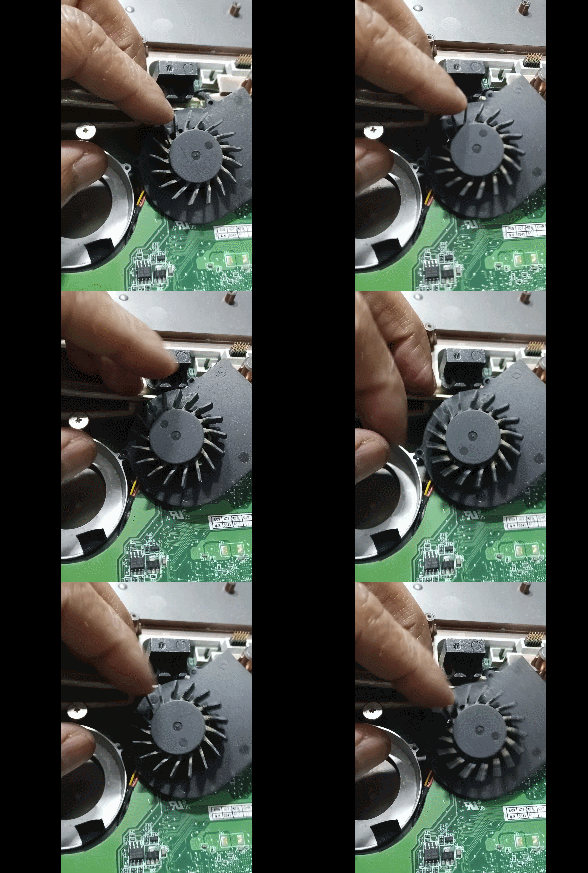
When I try to turn the blades, there's more resistance than usual, and sometimes it almost jams. I clean the dust with a brush, then use a little compressed air, and finally apply lubricating oil.
I clean the circuit board, use compressed air, and check that there are no liquid residues before reassembling everything.

While waiting for the new battery, I make a reusable cover using the rubber from a motorcycle tire I recycled a while ago.

Every restorer should have at least the basic sewing skills and equipment in their workshop for when repairing antique books or toys.
Spoiler alert: when your hands are so calloused and burned, remember to use thicker needles. I ended up breaking the needle and had to replace both the thread and the needle.

I placed the 3-volt battery with its rubber cover under the memory board. When the replacement arrives, changing it will be easier.

The supervisor was in a bad mood; I had some trouble getting him off the table and away from the laptop.

The maintenance is pretty far along. I still need to get the materials to make the pads that go under the keyboard area. I have to ask what color they want me to use for the pads, and when the 3-volt battery arrives, I'll replace it.

Cleaning the plastic casing gives the laptop a better look; I need to get the missing piece of the casing that covers the LEDs or make a replacement.

While I work out the remaining details, I can start working on the rest of the laptop.
Thank you very much for stopping by and reading.
I hope you have a wonderful week.
Peace.

I used Google Translate for the English language.
I used TextStudio for the Spanish header.
I used GifCam for the GIF image in the post.
Unless otherwise stated, all images are my own screenshots.


Saludos a la comunidad DIY de Hive, les deseo de todo corazón que lo bueno y positivo este con ustedes para este mes en todos sus proyectos.
Estoy sacando varias laptop pendientes de diferentes marcas que tengo en el taller, en este tipo de trabajo siempre hacemos la reparación más sencilla y fácil al comienzo y para el final se trabaja en el equipo que este mas complicado de reparar.

Estaré compartiendo el mantenimiento que le hice a una laptop escolar que popularmente en mi país llamamos Canaima. Le hacia falta un poco de cariño, se notaba el desgaste por el uso y le faltan piezas de la carcasa.
De alguna manera se podía ver que la tapa inferior no quedaba bien ajustada, algo no estaba bien colocado allí.

Al retirar la tapa de la parte inferior pude ver la causa, la pila de 3 volt estaba fuera de sitio y con un arreglo muy sospechoso.
En algún momento se agoto la pila de 3 volts y en vez de cambiarla le colocaron encima otra pila de 3 volts. En estos equipos el espacio es muy reducido, no tienes la oportunidad de meter mas cosas de lo que ya hay adentro de la carcasa.
Medí la pila de 3 volts que usaron como apaño y tenia un valor de menos de un voltio, cualquier pila o batería que te de un valor menor a la mitad de la carga máxima, es una pila agotada y no servirá para hacer la reparación, así que la retire.
Por las aberturas pude ver que la laptop estaba bastante llena de polvo, tengo que desarmarla para limpiarla y verificar también que el ventilador aun funciona bien.

Después de retirar todos los tornillos de la tapa inferior, verifico que no haya tornillos abajo de la tarjetas de memoria ni debajo de la tarjeta de Wifi.
Tengo que levantar el teclado para retirar los últimos tornillos que fijan la tapa inferior, con cuidado de no dañar el cable flex que lo conecta a la tarjeta electrónica. En los modelos recientes de estas laptop, hay que levantar unas pestañas que sostienen a presión el teclado desde el borde del lado de arriba. En este modelo que ya tiene unos años las pestañas están del lado inferior del borde del teclado.
Antes de separar la tapa inferior hay que tener cuidado de desconectar los cables flex, es un poco incomodo, los cables flex son muy cortos y no hay mucho espacio para trabajar con comodidad.

Superado los pasos anteriores, aprovecho para limpiar toda la suciedad que se anidaba adentro del laptop.

Tengo que verificar el estado del ventilador, solo tengo que retirar unos tres tornillos y separarlo de la tarjeta.

En verdad esperaba encontrar el ventilador con una capa de polvo mucho mayor, luce medianamente bien.
Cuando trato de girar las aspas hay mas resistencia de lo normal y en ocasiones casi se traba, le limpio el polvo con un cepillo, luego un poco de aire a presión, finalmente le aplico aceite lubricante.
Limpio la tarjeta electrónica, le aplico aire a presión, verifico que no tenga ningún residuo de líquidos antes de volver a cerrar todo.
Mientras llega la pila nueva, le hago un forro reusable aprovechando la goma de un neumático de moto, que recicle hace un tiempo.

Todo restaurador tiene que tener lo mínimo de conocimientos y equipos de costura en su taller, para cuando reparas libros o juguetes antiguos.
Spoiler, cuando tienes las manos tan duras y quemadas recordar usar agujas más gruesas, al final partí la aguja, tuve que cambiar el hilo y la aguja.
Acomode la pila de 3 volts con su forro de goma abajo de la tarjeta de memoria, cuando llegue el repuesto el cambio se me hace mas fácil.
El supervisor estaba de mal humor, tuve algunas dificultades para bajarlo de la mesa y apartarlo del laptop.

El mantenimiento quedo bastante adelantado, aún tengo que conseguir el material para hacer las almohadillas que van bajo la zona del teclado, debo preguntar que color van a querer que use en las almohadillas y cuando llegue la pila de 3 volts hacer el cambio.
La limpieza de la carcasa plástica le da una mejor vista al laptop, tengo que conseguir la pieza que falta de la carcasa que cubre los led o fabricar un reemplazo.
Mientras resuelvo los detalles que faltan ya puedo comenzar a trabajar en el resto de laptop.
Muchas gracias por pasar y leerme.
Espero que tengan una excelente semana.
Paz.
He usado el traductor de Google para el idioma inglés.
Use el programa de TextStudio para el encabezado en español.
Use el programa GifCam para la imagen GIF de la publicación.
Las imágenes a menos que se indique son capturas de imagen propias.
Greetings, thank you very much for your support.
I hope you have a great month.
Un trabajo que toma su tiempo.
Estaba bien fea la batería esa.
This post has been manually curated by @bhattg from Indiaunited community. Join us on our Discord Server.
Do you know that you can earn a passive income by delegating to @indiaunited. We share more than 100 % of the curation rewards with the delegators in the form of IUC tokens.
Here are some handy links for delegations: 100HP, 250HP, 500HP, 1000HP.
100% of the rewards from this comment goes to the curator for their manual curation efforts. Please encourage the curator @bhattg by upvoting this comment and support the community by voting the posts made by @indiaunited.
Thank you so much for supporting the post to curator @bhattg and as always grateful to the team at @indiaunited.
Thank you so much for your support, I'm very glad you liked the topic of the post.
Many thanks to curator @bhattg and the @hivepakistan team.
I hope you have a peaceful and very productive month.