Digital Archaeology: Dell Inspiron E1705


The Inspiron line has long been Dell's main consumer laptop models (well, until very recently when they for some reason started naming all their machines very generically). The Inspiron E1705 was released in the 2005 timeframe. It is for all practical purposes identical to the Inspiron 9400. They just had different default configuration options and were targeted at different markets. It is also substantially the same as the M90 and XPS models of the same time period, again, with different default configuration options. I made a post about the 9400 a while back and a lot of this will sound the same because they are basically the same machine with some configuration differences.

The Inspiron E1705 supported a very large range of hardware options. There were two different motherboards used. One supported add-in video cards such as the FX2500M, GeForce Go 7800 and 7900GTX among others while the second motherboard option only supported Intel's integrated graphics. Display options included a 17" Wide Screen WXGA+ (1440x900) panel or a 17" Ultrasharp Wide Screen WUXGA (1920x1200) panel. The processor could be anything from a single core 32-bit Core Solo T1300 running at 1.66 GHz all the way up to 64-bit Core 2 Duo T7600 running at 2.33 GHz.

My particular E1705 is definitely one of the lower end models. Specs include:
- CPU: Core Solo T1350 @ 1.86 GHz
- Graphics/Chipset: Intel 945GM
- Memory: 1GB DDR2-533 (2x512MB)
- Display: 17" WXGA+ (1440x900)
- Hard Drive: 80GB 5400RPM
- Optical Drive: 8x DVD +/-RW with Dual-Layer DVD-R Write Support
- Networking: Integrated 10/100 Ethernet and V.92 56K Modem, 802.11b/g WLAN

Plus tons of expansion slots and ports including 4 USB 2.0 ports, an ExpressCard 54mm slot, FireWire, 5-in-1 Flash Reader, headphone and microphone connections, 1 DVI-D, 1 VGA, and 1 S-Video Out. I miss all the built-in I/O options laptops used to have. These days you generally have to find a USB-C dongle with whatever you need.

As far as upgrade possibilities, a Core 2 Duo T7600 could be added and up to 4GB of 667MHz DDR2 RAM is supported. Unfortunately, there are no graphics update options as this motherboard in the one with the built-in Intel chipset/graphics. However, the Intel version is the more reliable one. nVidia chips of that era had issues with the solder used and almost always inevitable fail at some point. There is also an ATI (X1400) version but that one seems to be more rare though that's what I have in my 9400.

This laptop was made with Windows XP and Vista in mind. It is also capable of running Windows 7 and even Windows 10 (though some more RAM would definitely be needed). However, modern operating systems supporting 32-bit CPUs are gettig pretty hard to find these days. Windows 10 dropped support in 2020. I'm currently running a 32-bit version of Debian which is the only mainstream Linux distribution I am aware of that still does new 32-bit releases. The Insprion E1705 is capable of being upgraded to 64-bit CPUs as mentioned above, however it is still limited to about 4 GB of RAM due to limitations of the chipset.

Like pretty much any computer I ever own, this one is running BOINC whenever it is turned on. It still gets work for at least Einstein@home and maybe a couple of others.

Overall, this seems to be a pretty solid laptop with a great deal of expansion possibility for its time. The build quality is decent and the keyboard feels pretty good. However, it isn't as nice in that regard as later Latitudes and Precisions. Despite pushing the CPU at 100% all the time with BOINC, it runs cool and quiet. The large size no doubt helps some with that, plus it has a pretty anemic single core CPU at the moment. If I had been in the market for a laptop at the time this one was being sold, it probably would have been a top contender (though with a Core 2 Duo CPU and the higher resolution screen).

Despite having some fairly significant upgrade potential, I doubt I will be upgrading this one. I would rather start with the model with the higher resolution screen and perhaps the ATI graphics option if I were going to bother. Having said that, there's a good chance I have a Core 2 Duo that would work and some extra memory so who knows...but I'll probably save that for the 9400 I have.

Check out the complete specs of this laptop via HardInfo here.

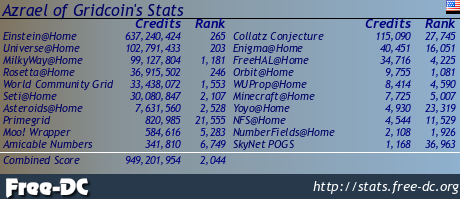
And if you are curious how it is getting along in BOINC, see it's einstein@home stats or check out its overall stats via FreeDC.

Check out some of my other recent posts:
Vintage Photos - Lot 6 (109-112)
https://ecency.com/photography/@darth-azrael/vintage-photos-lot-6-109
PC World (March 1993)
https://ecency.com/retrocomputing/@darth-azrael/pc-world-march-1993
Vintage Photos - Lot 6 (105-108)
https://ecency.com/photography/@darth-azrael/vintage-photos-lot-6-105
Amiga Force (April 1993)
https://ecency.com/retrogaming/@darth-azrael/amiga-force-april-1993
Vintage Photos - Lot 6 (101-104)
https://ecency.com/photography/@darth-azrael/vintage-photos-lot-6-101
PC World (July 1995)
https://ecency.com/retrocomputing/@darth-azrael/pc-world-july-1995
Check out my other Social Media haunts:
Wordpress: https://www.megalextoria.com/wordpress
Tumblr: https://www.tumblr.com/blog/darth-azrael
Blogger: https://megalextoria.blogspot.com/
Odyssee: https://odysee.com/@Megalextoria:b
Rumble: https://rumble.com/c/c-2385054
Daily Motion: https://www.dailymotion.com/Megalextoria
Books I am reading or have recently read:
Harry Potter and the Chamber of Secrets by J.K. Rowling.
Thomas Cromwell: A Revolutionary Life by Diarmaid MacCulloch.
Harry Potter and the Sorcerer's Stone by J.K. Rowling.
Mine Monero in your browser!
Earn Gridcoin while also helping various scientific projects by sharing your computer's idle CPU time!
⚠️⚠️⚠️ ALERT ⚠️⚠️⚠️
HIVE coin is currently at a critically low liquidity. It is strongly suggested to withdraw your funds while you still can.
@darth-azrael, I'm refunding 0.175 HIVE and 0.000 HBD, because there are no comments to reward.
https://bsky.app/profile/did:plc:ggtlieencodejd6phc7m3ea7/post/3mfbgezygw22z
https://bsky.app/profile/did:plc:ggtlieencodejd6phc7m3ea7/post/3mfbgezygw22z
The rewards earned on this comment will go to the author of the blog post.