Digital Archaeology: Dell Inspiron E1405


I'm not sure why what were identical models were released under two different model numbers but that seems to be the case with the Dell Inspiron 640m / Dell Inspiron E1405. According to ChatGPT, this was related to a transition in Dell naming conventions (sound familiar?). The 640m designation is the older naming scheme whereas the E1405 naming scheme is newer. The 'E' supposedly stands for 'Entertainment' but without a dedicated graphics chip, I guess that was meant to refer to using it for DVD playback or something. It does have a row of media control buttons on the front that were common at the time. I have the model labeled as E1405 and it's config includes:
- CPU: Pentium T2050 @ 1.6 GHz
- Memory: 1 GB
- Video: Integrated Intel G45GM
- Screen: 14.1" 1280x800
For more hardware info, check out the report from HardInfo.

The "Pentium" in this case was a Core Duo CPU with half the cache (1 MB instead of 2 MB). This made for a slightly slower CPU. A nearly identical Core Duo model at the same clock speed was about 8% faster on average.

Like a lot of laptop models, especially at the time, this one had a wide range of configurations. Wikipedia reports the following possible components:
Processor: Intel Centrino — Core Duo T2050 or T2500, or Core 2 Duo T5500, T5600, T7200, T7400, T7600
Memory: 1, 2, 3, or 4 GB of shared dual channel DDR2 SDRAM @ 667 MHz.
Chipset: Intel 945GM Express
Graphics Processor: integrated Intel GMA 950.
LCD Display: 14.1" (16:10) - with 1280 × 800 resolution, or with 1280 × 800 resolution and TrueLife, or with 1440 × 900 resolution and TrueLife.
Storage: 80 or 100 GB SATA HDD at 5400 RPM.
Optical Drive: tray-load, 8x dual-layer DVD+/-RW or 24x DVD / CD-RW.
Battery: 6-cell (56 Whr), or 9-cell (85 Whr) Lithium Ion.
Wi-Fi Card: mini-card, Dell Wireless 1390 802.11g or 5100 802.11n.
Bluetooth: Optional Dell Wireless Bluetooth Internal 350.
I/O ports: 4 USB ports, 1 FireWire port, 1 Fast Ethernet port, 1 56K modem, 1 5-in-1 memory card reader, 1 Express Card slot, 1 VGA output, 1 S-Video output, 1 headphone jack, 1 microphone jack/line-in, and 1 power adapter port.

Even this seems incomplete as I have seen references to this model with Core Solo processors. The fact that you could upgrade to a Core 2 Duo is pretty significant as this essentially takes you from a 32-bit system to a 64-bit system. If I wanted to, I should be able to put up to a Core 2 Duo T7600 in this machine which not only gives it a significant cache and clock speed boost, but also moves it from being a 32-bit system to a 64-bit system. The only downside is the fact that the memory is still limited to 4 GB.

The 1 GB in this machine consists of 2 512MB sticks and is probably the original amount. Replacing both of those with 2 GB sticks is probably the single easiest upgrade.
Upgrading the CPU isn't two difficult either and Switching to a 64-bit CPU would enable it to run a modern OS like Windows 10 if you really, really wanted to or Linux. While the top end T7600 might cost a bit more, picking up any of the others should be dirt cheap. With the Core Duo that is currently in this machine, you are limited to 32-bit versions of Windows and Linux.

The only other reasonable upgrade is adding an SSD. SSDs are much faster than mechanical hard drives even on older and slower interfaces. Often, this provides the most effective upgrade in terms of speed.
My particular machine has a couple of flaws. There are two horizontal lines of dead pixels, one in the middle of the screen and one almost at the bottom. I'm not 100% sure if these are actually dead pixels or if there is an issue with the video cable. The other less significant flaw is that the hinges seem a bit loose. However, these things make it so that the machine isn't worth selling or upgrading. Though I'm typing on it now as I write this, it will probably be relegated to a parts machine.

Currently, mine still has its original 80 GB hard drive. Originally, it would have had a 32-bit version of Windows Vista installed. For a while it has a 32-bit version of Debian Linux installed. Even with the low amount of RAM is ran reasonably well except for web browsing which was very sluggish. Over the years, web browsers have become even more bloated than Windows. The best use for this machine is probably for some retro Windows Vista usage anyway. Unfortunately, due to the lack of a dedicated graphics chip, it isn't really suitable for many games that were being released at the time. I've since installed Windows XP which is much snappier.
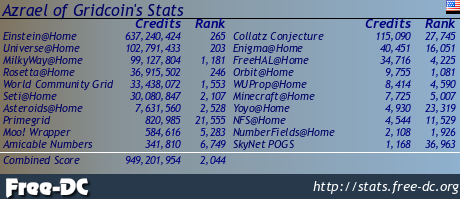
Like all the machines I use, this one has BOINC installed. Currently it is doing work for Einstein@home. You can check out how it is doing there or via FreeDC.
Check out some of my other recent posts:
Vintage Photos - Lot 6 (061-064)
https://ecency.com/photography/@darth-azrael/vintage-photos-lot-6-061
GamePro (November 1997)
https://ecency.com/retrogaming/@darth-azrael/gamepro-november-1997
Vintage Photos - Lot 6 (057-060)
https://ecency.com/photography/@darth-azrael/vintage-photos-lot-6-057
Vintage Photos - Lot 6 (053-056)
https://ecency.com/photography/@darth-azrael/vintage-photos-lot-6-053
Info (November/December 1986)
https://ecency.com/retrocomputing/@darth-azrael/info-november-december-1986
Check out my other Social Media haunts (though most content is links to stuff I posted on Hive or re-posts of stuff originally posted on Hive):
Wordpress: https://www.megalextoria.com/wordpress
Tumblr: https://www.tumblr.com/blog/darth-azrael
Blogger: https://megalextoria.blogspot.com/
Odyssee: https://odysee.com/@Megalextoria:b
Rumble: https://rumble.com/c/c-2385054
Daily Motion: https://www.dailymotion.com/Megalextoria
Books I am reading or have recently read:
Thomas Cromwell: A Revolutionary Life by Diarmaid MacCulloch.
Harry Potter and the Sorcerer's Stone by J.K. Rowling.
You Like It Darker by Stephen King.
Mine Monero in your browser!
Earn Gridcoin while also helping various scientific projects by sharing your computer's idle CPU time!
https://bsky.app/profile/did:plc:ggtlieencodejd6phc7m3ea7/post/3md2uwmdbi22m
https://bsky.app/profile/did:plc:ggtlieencodejd6phc7m3ea7/post/3md2uwmdbi22m
The rewards earned on this comment will go to the author of the blog post.
@darth-azrael, I'm refunding 0.172 HIVE and 0.016 HBD, because there are no comments to reward.